Showing posts with label PI. Show all posts
Showing posts with label PI. Show all posts
Tuesday, April 5, 2016

OMV on PI
Bad Gateway after update of PHP
installing the php5-pam update is the problem. It only works on true armhf systems.
Login via ssh as root and try:
Bad Gateway after update of PHP
installing the php5-pam update is the problem. It only works on true armhf systems.
Login via ssh as root and try:
wget http://omv-extras.org/debian/pool/main/p/php5-pam/php5-pam_1.0.3-2_armhf.debdpkg -i php5-pam_1.0.3-2_armhf.debrebootoriginal sourceopenmediavault.orgMonday, April 20, 2015
Disable Wifi Power Management
If you are experiencing drop outs on your wifi interent connection, it could be that your dongle is turning itself off after an idle period. To stop your wifi dongle doing this, we need to disable its power management.
Either SSH to your Pi, or login to its desktop and open up a terminal.
First, make a backup of your existing interfaces file:
sudo cp /etc/network/interfaces /etc/network/interfaces.backup
Now edit the original interfaces file:
sudo nano /etc/network/interfaces
Assuming you haven’t edited this file before all you need to do is delete its entire contents, and copy the following into it:
auto lo
iface lo inet loopback
iface eth0 inet dhcp
auto wlan0
allow-hotplug wlan0
iface wlan0 inet dhcp
wpa-conf /etc/wpa_supplicant/wpa_supplicant.conf
wireless-power off
iface default inet dhcp
iface lo inet loopback
iface eth0 inet dhcp
auto wlan0
allow-hotplug wlan0
iface wlan0 inet dhcp
wpa-conf /etc/wpa_supplicant/wpa_supplicant.conf
wireless-power off
iface default inet dhcp
The important block of code here is:
auto wlan0
allow-hotplug wlan0
iface wlan0 inet dhcp
wpa-conf /etc/wpa_supplicant/wpa_supplicant.conf
wireless-power off
iface default inet dhcp
allow-hotplug wlan0
iface wlan0 inet dhcp
wpa-conf /etc/wpa_supplicant/wpa_supplicant.conf
wireless-power off
iface default inet dhcp
So only add that section if you have a custom configuration for any other network interfaces.
Now exit the nano editor and save your changes:
Ctrl+x
Y
Enter
Y
Enter
Now reboot your raspberry pi:
sudo reboot
Once the raspberry pi has rebooted, check that the wifi dongle’s power management has been disabled by typing this command:
iwconfig
And checking for: “Power Management:off”
Monday, December 9, 2013


Fusion and Arabic repo
Navigate to “SYSTEM” and then open “File Manager.”

Select “Add Source” on the Left Side of the Screen.

Click on the text box that says <None> to open up the keyboard and type “http://fusion.tvaddons.ag/” (without quotations) on the keyboard and then choose the “Done” button on the left side of the keyboard.
 type"fusion" as the name of the media source then press the “Done” button again, verify that your screen appears as follows, and then press the “OK” button at the bottom in order to save the new file source.


 Choose the “fusion” folder listed on the right side of the popup.

or simply download the repository zip and install it in XBMC
and follow install from zip
After installing the repo go again to "Addons", then "Get Addons"

Thanks to Hady Osman
source
Select “Add Source” on the Left Side of the Screen.

Click on the text box that says <None> to open up the keyboard and type “http://fusion.tvaddons.ag/” (without quotations) on the keyboard and then choose the “Done” button on the left side of the keyboard.

From the Main Menu, choose “Settings” under the “SYSTEM” menu listing.

Choose the “Addons” menu from the left side of the window.

Select the “Install from zip file” option from the list.


you can choose any plugin to install or for Arabic
Browse to the following direction structure: /video/world/arabic
Choose: repository.arabic.xbmc-addons-1.0.0.zip
or simply download the repository zip and install it in XBMC
and follow install from zip
After installing the repo go again to "Addons", then "Get Addons"

then choose "Arabic XBMC Add-on Repository", then Video addons and pick what you want, currently the available addons are
1 Shahid.Net
2 Al Qahera Al Youm
3 ATN Network
4 GL Arab
5 Teledunet
6 Sotwesoora.Tv
7 Bokra
8 Panet
9 Alarab
10 DailyTube4U.com
11 Syrian-drama
12 Alquds Eyes
13 Arabichannels
14 DramaCafe
14 Dubai TV
Thanks to Hady Osman
source
Install a repo or plugin from zip file
to Install a repo or plugin from zip file you need the zip file for the plugin or repo located in a assessable folder.
then Install the downloaded zip file by going to "System > Addons > Install a ZIP file", select the file and click Install.

then Install the downloaded zip file by going to "System > Addons > Install a ZIP file", select the file and click Install.

Tuesday, August 6, 2013
Arabic Plugins
Hi There,
A list of interesting Arabic plugins.
1. Shahid.net (updated October 2013)

Installation
Install the plugin from the zip
plugin Zip
Shahid v8.0
information source
xbmc.org
2. Dubai Media INC

Installation
Install the plugin from the zip OR install it as a video source
video-source
go to video->files->'add videos', then type the source as rss://frfsh12lnk.appspot.com/?url=dmi
plugin Zip
DMI
information source
xbmc.org
3. istikana

Installation
Install the plugin from the zip OR install it as a video source
video-source
go to video->files->'add videos', then type the source as rss://myseeon12.appspot.com/?url=lst
plugin Zip
istikana
information source
xbmc.org
4. Arabic repository
1. Al Qahera Al Youm
2. Sotwesoora.Tv
3. GLArab - need a proxy on a PC
4. ATN Network - you need to subscribe
5. Shahid.net - NOT working use the one above
6. Teledunet.com. nice live streams
Installation
install it using “System > Addons > Install a ZIP file“. This will install a repository containing the arabic repository.
plugin Zip
Repository
information source
xbmc.org
A list of interesting Arabic plugins.
1. Shahid.net (updated October 2013)
Installation
Install the plugin from the zip
plugin Zip
Shahid v8.0
information source
xbmc.org
2. Dubai Media INC
Install the plugin from the zip OR install it as a video source
video-source
go to video->files->'add videos', then type the source as rss://frfsh12lnk.appspot.com/?url=dmi
plugin Zip
DMI
information source
xbmc.org
3. istikana

Installation
Install the plugin from the zip OR install it as a video source
video-source
go to video->files->'add videos', then type the source as rss://myseeon12.appspot.com/?url=lst
plugin Zip
istikana
information source
xbmc.org
4. Arabic repository
1. Al Qahera Al Youm
2. Sotwesoora.Tv
3. GLArab - need a proxy on a PC
4. ATN Network - you need to subscribe
5. Shahid.net - NOT working use the one above
6. Teledunet.com. nice live streams
Installation
install it using “System > Addons > Install a ZIP file“. This will install a repository containing the arabic repository.
plugin Zip
Repository
information source
xbmc.org
Monday, August 5, 2013

Multi Boot option
Tired of swapping SDs to try different OS?
Do you have different use cases for your PI and each needs another OS?
You can use BerryBoot to have more OS running on the PI, you can do that even using a small SD and having all OSs on the USB drive

Download link Berryboot for the Raspberry Pi: berryboot-20130528.zip
Simply format your SD to FATxx, and simply extract the content of the above ZIP file there.
you can install on the USB drive but make sure that it is empty since it will be formatted by the Berry..
Friday, August 2, 2013
Installing Super Repo
Super Repo is the huge source of plugins
http://superrepo.org/
How to add it
http://superrepo.org/get-started/add-the-super-repo-directory-as-source/
Addons that worth installing
1. IceFilms
2. NotFilmOn
3. NaviX
4. Mashup
Controlling Openelec with TV Remote
If you want to control your openelec installation using your TV remote via HDMI connector, your TV need to have HDMI-CEC standard. first you have to know if your TV is HDMI-CEC capable or not?
Different brands for HDMI CEC
There are different trade names for HDMI CEC, search your TV manual, Box and the TV itself for one of the following.
Samsung - Anynet+
Sony - BRAVIA Link or BRAVIA Sync
Sharp - Aquos Link
Hitachi - HDMI-CEC
AOC - E-link
Pioneer - Kuro Link
Toshiba - Regza Link or CE-Link
Onkyo - RIHD (Remote Interactive over HDMI)
LG - SimpLink
Panasonic - VIERA Link or HDAVI Control or EZ-Sync
Philips - EasyLink
Mitsubishi - NetCommand for HDMI
Runco International - RuncoLink
PS: some TVs might have it only on 1 dedicated HDMI slot eg. HDMI1 or HDMI-CEC
Have Fun
Different brands for HDMI CEC
There are different trade names for HDMI CEC, search your TV manual, Box and the TV itself for one of the following.
Samsung - Anynet+
Sony - BRAVIA Link or BRAVIA Sync
Sharp - Aquos Link
Hitachi - HDMI-CEC
AOC - E-link
Pioneer - Kuro Link
Toshiba - Regza Link or CE-Link
Onkyo - RIHD (Remote Interactive over HDMI)
LG - SimpLink
Panasonic - VIERA Link or HDAVI Control or EZ-Sync
Philips - EasyLink
Mitsubishi - NetCommand for HDMI
Runco International - RuncoLink
PS: some TVs might have it only on 1 dedicated HDMI slot eg. HDMI1 or HDMI-CEC
Have Fun
PI as Media Center
Most interesting use case for the PI to use it as a Media center, XBMC is best Media center that you can ever us.
Lucky XBMC runs on PI you can get different releases / builds but my main one is the openelec

To Install openelec you need the following
Hardware
1. your PI
2. SD card I recommend 2GB, more is OK but not needed
Software
1. openelec image get the latest here
2. Tool to prepare the card MINI Partition Manager
3. Instruction to follow, TasksOfOhm did a good job there to explain it. you have to follow that really to the word, it works good.
Install it and lets see
Lucky XBMC runs on PI you can get different releases / builds but my main one is the openelec

To Install openelec you need the following
Hardware
1. your PI
2. SD card I recommend 2GB, more is OK but not needed
Software
1. openelec image get the latest here
2. Tool to prepare the card MINI Partition Manager
3. Instruction to follow, TasksOfOhm did a good job there to explain it. you have to follow that really to the word, it works good.
Install it and lets see
Thursday, August 1, 2013
My Very first blog
Hi there,
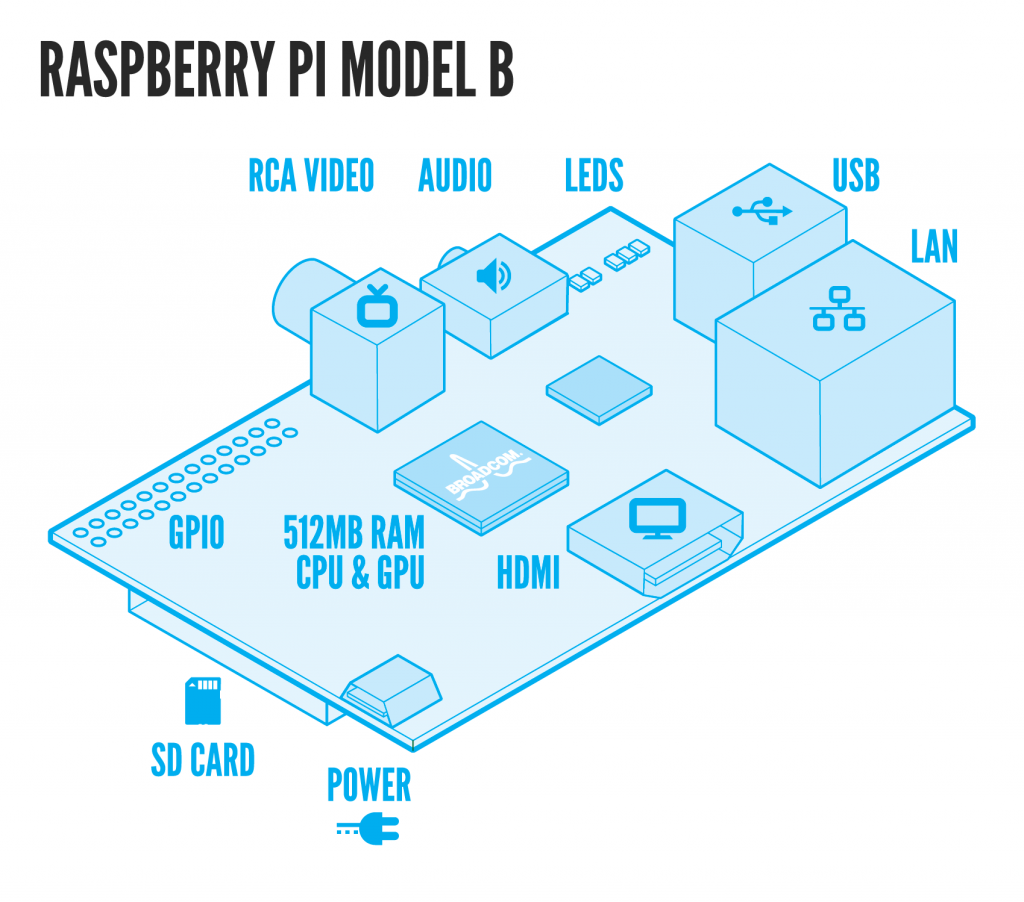
This is my very first ever blog, the idea is to share my findings about THE RASPBERRY PI with all my friends who have, love it or even thinking about it.
If you don't know what am I talking about check this Raspberry PI.

If you are interested let me know and follow or read.
Over and Out.
Badway
This is my very first ever blog, the idea is to share my findings about THE RASPBERRY PI with all my friends who have, love it or even thinking about it.
If you don't know what am I talking about check this Raspberry PI.
If you are interested let me know and follow or read.
Over and Out.
Badway
Subscribe to:
Posts (Atom)